
Top Encryption Risks in SOC 2 Compliance
Post Summary
Encryption is a key part of SOC 2 compliance, especially in healthcare, where protecting sensitive data like PHI is critical. However, common encryption risks can jeopardize compliance, including:
- Weak encryption standards: Using outdated algorithms like SSL 3.0 or TLS 1.0 can lead to audit failures. SOC 2 expects TLS 1.2 or higher for data in transit and AES-256 for data at rest.
- Poor key management: Storing keys insecurely, hardcoding them, or failing to rotate them regularly can undermine encryption.
- Unencrypted data transit: Internal network traffic or APIs using plaintext communication create vulnerabilities.
- Data at rest gaps: Overlooked areas like backups, logs, or staging environments often lack encryption.
- Cloud misconfigurations: Relying on default cloud settings without customer-managed keys or audit trails can lead to compliance issues.
To address these risks, organizations should map all data locations, standardize encryption protocols, centralize key management, and document everything. Regular monitoring and evidence collection are essential to demonstrate compliance during audits. Utilizing real-time portfolio risk management can further streamline this process.
Common Encryption Risks in SOC 2 Compliance
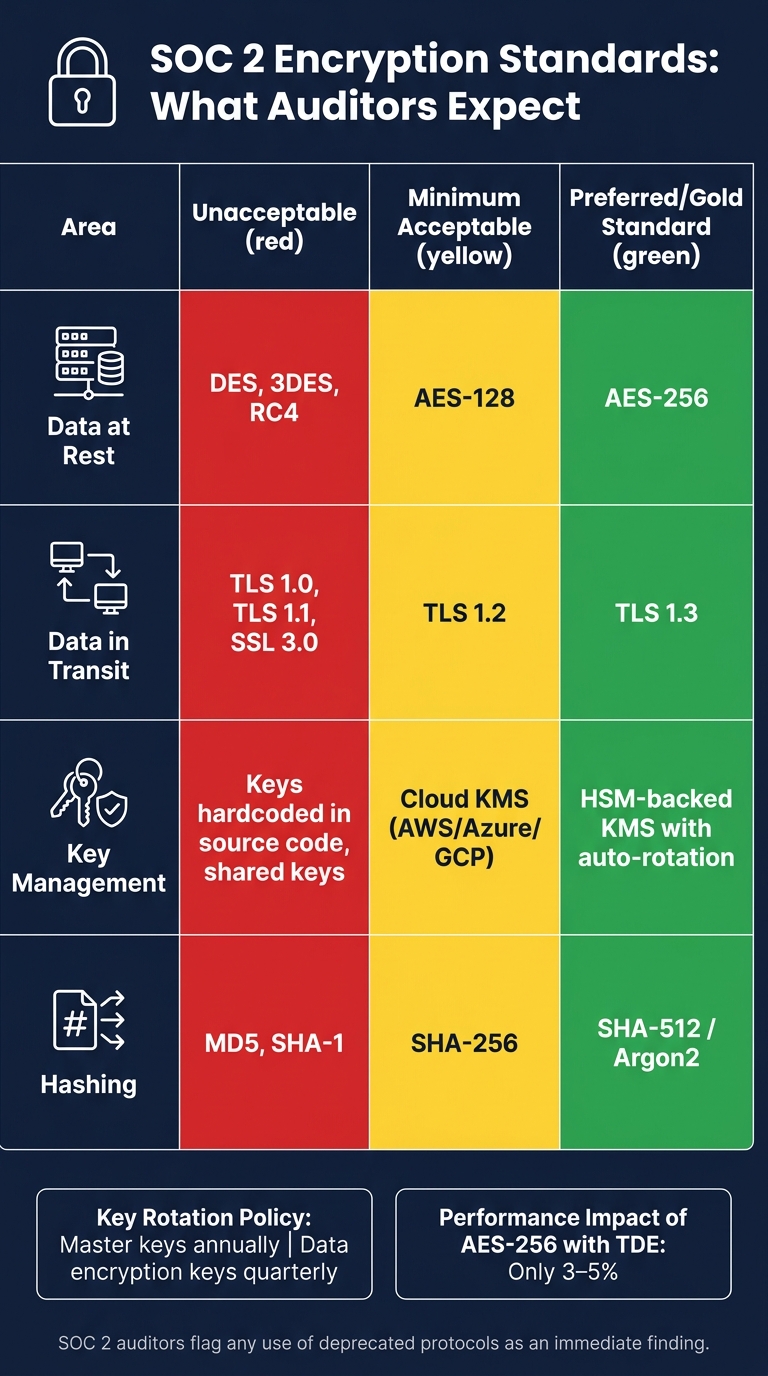
SOC 2 Encryption Standards: Acceptable vs. Unacceptable Protocols
Encryption plays a pivotal role in achieving SOC 2 compliance, particularly for healthcare organizations. However, several risks often go unnoticed, stemming from vulnerabilities in systems, configurations, and processes. These issues can jeopardize compliance if not addressed. Let’s break down some common areas where encryption risks arise.
Weak Encryption Standards
Using outdated encryption algorithms is a surefire way to fail compliance. For instance, protocols like SSL 3.0, TLS 1.0, and TLS 1.1 are no longer considered secure. Similarly, cipher suites such as RC4 and 3DES are outdated and prone to vulnerabilities. SOC 2 auditors now expect TLS 1.2 as the baseline standard for data in transit, though TLS 1.3 is preferred [4][2].
When it comes to data at rest, AES-256 is the gold standard. While AES-128 might be acceptable in some cases, older algorithms like RSA-1024 or DES are flagged immediately. The good news? Upgrading to AES-256 with Transparent Data Encryption (TDE) typically impacts performance by only 3–5% [1].
Here’s a quick look at protocol and algorithm risk levels:
| Protocol/Algorithm | SOC 2 Status | Risk Level |
|---|---|---|
| TLS 1.3 / AES-256 | Preferred Standard | Low |
| TLS 1.2 / AES-128 | Minimum Acceptable | Low–Medium |
| TLS 1.1 / 3DES | Deprecated | High |
| TLS 1.0 / SSL 3.0 / RC4 / DES | Insecure | Critical - Immediate Finding |
Poor Key Management Practices
Encryption is only as strong as its key management. Storing encryption keys in plaintext files, embedding them in source code, or keeping them alongside encrypted data undermines security [4][1].
"Encryption without proper key management is like having a vault with the combination written on the door. You've technically secured it, but you've fundamentally missed the point." - Naina Patel, Cybersecurity Expert [1]
SOC 2 auditors also look for documented key rotation policies. Automated key rotation is typically expected - annually for master keys and quarterly for data encryption keys, particularly when managing sensitive data like PHI. Hardcoded or non-rotating keys are likely to result in an automatic audit failure [1][2].
Gaps in Encryption During Data Transit
Unencrypted traffic within internal networks is a common vulnerability. For example, if microservices communicate over plaintext HTTP instead of mutual TLS (mTLS), sensitive data like PHI can be exposed. Many organizations focus on securing external endpoints while assuming internal networks are inherently safe. This assumption creates a significant risk if the network is compromised [1][2].
In addition, inconsistent encryption across APIs, remote access channels, and third-party integrations can lead to compliance gaps flagged under CC6.7.
Gaps in Encryption for Data at Rest
While production databases are often encrypted, secondary data storage locations are frequently overlooked. Areas like backups, staging environments, log files, Redis caches, and temporary storage are common blind spots. SOC 2 auditors expect encryption to be consistently applied across all locations where sensitive data is stored [4][1].
For example, an unencrypted database snapshot or a misconfigured S3 bucket used for backups can lead to significant compliance issues. Conducting a thorough data asset inventory helps identify and address these vulnerabilities before an audit.
Misconfigured Cloud Encryption
Misconfigurations in cloud environments can pose serious risks. For instance, relying solely on provider-managed keys without detailed audit trails or granular access controls can leave gaps. Default encryption settings from cloud providers often don’t meet the stringent requirements for sensitive healthcare data [4][2].
Under the shared responsibility model, cloud providers handle infrastructure security, but organizations are responsible for configuring encryption to meet their needs. Failing to enable Customer-Managed Keys (CMK) through tools like AWS KMS or Azure Key Vault - or neglecting to encrypt storage volumes and S3 buckets - can result in compliance issues. Detailed logging of key usage through CMK configurations is especially critical in healthcare settings [4].
sbb-itb-535baee
Operational and Documentation Gaps in SOC 2 Compliance
When it comes to SOC 2 compliance, having strong encryption standards is just one piece of the puzzle. The operational practices and documentation surrounding these standards are equally critical. Auditors don't just check for encryption - they ensure it's consistently applied, properly monitored, and thoroughly documented.
Incomplete PHI Coverage
Protected Health Information (PHI) often ends up in unexpected places, such as logs, error messages, debug files, caches, or message queues. These areas are sometimes overlooked during compliance reviews. Additionally, environments like analytics platforms or data warehouses are often excluded from the compliance scope. This creates risks unless there are documented de-identification processes in place. Organizations often assume that de-identified data doesn't require protection, but auditors will demand proof of the de-identification process and evidence that the environment housing this data is secure.
Non-production environments, such as staging and testing, are another frequent blind spot. These environments must either use full encryption or synthetic data. Using unencrypted copies of production data, even temporarily, is a common reason for compliance failures. To meet audit expectations, organizations must also provide monitoring and documentation to demonstrate these measures are effective.
Evidence and Monitoring Gaps
Auditors require tangible proof to assess the effectiveness of encryption policies. This includes logs, screenshots, and records of key rotations. A common pitfall is documenting a 90-day key rotation policy but failing to automate it. For instance, if an auditor checks the AWS KMS console and discovers a key hasn't been rotated in years, the policy becomes meaningless. To avoid this, organizations should use cloud-native tools like AWS CloudTrail or Google Audit Logs to create immutable, timestamped records of encryption and decryption operations. These logs should be retained for at least 12 months, with the most recent 90 days readily accessible online.
For web-facing endpoints, tools like SSL Labs can provide independent verification of strong TLS 1.2+ configurations. A Grade A rating from an SSL Labs scan serves as evidence of robust encryption. Below is a summary of the evidence auditors typically require for key data locations:
| Data Location | Auditor Evidence Requirement |
|---|---|
| Databases | Screenshots showing encryption is enabled and linked to the appropriate keys |
| Backups | Documentation proving that backups inherit encryption, along with associated logs |
| In Transit | SSL Labs "Grade A" reports and verification of HSTS headers |
| Key Management | Records of key rotation and policies outlining restricted access to keys |
| Endpoints | Reports confirming encryption tools like FileVault or BitLocker are active |
To ensure audit readiness, a formal key lifecycle is essential. This includes key generation, secure storage (separate from the data it protects), access controls, rotation, and destruction. Additionally, having at least two designated key custodians in the key management policy is a key requirement for both HIPAA and SOC 2 compliance. These measures demonstrate a well-structured approach to encryption and key management, bolstering an organization’s compliance efforts.
How to Fix Encryption Risks in SOC 2 Compliance
Once you've pinpointed encryption vulnerabilities, the next step is tackling the weaknesses head-on. Using cloud-native tools can simplify the process and make remediation more manageable.
Inventory and Standardize Encryption Protocols
The first step is knowing exactly where sensitive data resides. This means creating a comprehensive map of all locations where ePHI is stored or processed in your systems. Think production databases, backups, staging environments, log files, Redis caches, message queues, and even third-party integrations. Skipping this step can lead to unpleasant surprises, like discovering unprotected data in unexpected parts of your infrastructure.
Once you've mapped everything, it's time to standardize your encryption protocols. Auditors typically expect AES-256 for data at rest and TLS 1.2 or higher for data in transit. Anything older - such as TLS 1.0, TLS 1.1, SSL 3.0, DES, or RC4 - should be disabled, especially on load balancers and public endpoints. Here's a quick reference table for what auditors deem acceptable:
| Area | Minimum Expected | Preferred | Unacceptable |
|---|---|---|---|
| Data at Rest | AES-128 | AES-256 | DES, 3DES, RC4 |
| Data in Transit | TLS 1.2 | TLS 1.3 | TLS 1.0, 1.1, SSL 3.0 |
| Key Management | Cloud KMS | HSM-backed KMS | Keys in code, shared keys |
| Hashing | SHA-256 | SHA-512 / Argon2 | MD5, SHA-1 |
Don't forget about internal traffic. Encrypting communication between services with mutual TLS (mTLS) or a service mesh is becoming a standard expectation, especially for microservices that handle sensitive data.
Once your protocols are standardized, focus on consolidating key management to further strengthen your encryption practices.
Centralize Key Management
One major reason encryption controls fail audits is scattered, self-managed keys. The solution? Consolidate key management into a cloud-native service like AWS KMS, Google Cloud KMS, or Azure Key Vault. These tools offer hardware-backed storage, integrated audit logs, and automated rotation, reducing the manual workload of managing keys.
Enable automatic annual rotation for all customer-managed keys (CMEKs) and restrict access to specific service accounts. If you're managing a multi-tenant healthcare platform, assign unique keys per tenant or clinic. This approach limits the potential damage if a single key is compromised.
Audit Cloud and Backup Encryption Settings
Key management is just one piece of the puzzle. You also need to ensure consistent encryption settings across all cloud resources and backup environments. A common mistake is encrypting production databases but leaving backups, snapshots, or temporary storage unprotected. Auditors frequently look for this and flag it as a failure point.
To avoid this, enable default encryption for all cloud storage resources - like S3 buckets, RDS instances, EBS volumes, and Azure Blobs - so new resources are encrypted automatically. Then double-check that database snapshots and archives inherit encryption settings from their source. Use your cloud console to verify this and document the results. For public-facing endpoints, run SSL Labs scans to confirm a Grade A rating and make sure HSTS headers are enabled to prevent protocol downgrade attacks.
Document Control Testing and Monitoring
After improving your encryption settings, set up systems to test and monitor these controls regularly. This ensures they're working as intended and provides the evidence auditors need during a SOC 2 review.
Create a formal key lifecycle document - about two to four pages - detailing approved algorithms, key management roles, rotation schedules, and destruction procedures. Use cloud-native logging tools to capture immutable, timestamped records of encryption operations, and keep these logs for at least 12 months. Schedule regular control tests, like quarterly SSL Labs scans and KMS configuration reviews, to catch any issues early.
For healthcare organizations managing complex vendor and clinical system risks, platforms like Censinet RiskOps™ can help. These tools provide continuous risk monitoring and streamline evidence collection, so you're always prepared for an audit.
"Encryption is one of those controls that auditors expect to see fully implemented before they walk through the door." - SecurityDocs [4]
Conclusion: Maintaining SOC 2 Compliance Through Encryption
SOC 2 audit failures often stem from multiple encryption weaknesses - like outdated cipher suites, unencrypted backups, hardcoded keys, or neglected key rotation. These vulnerabilities collectively paint a picture that auditors are quick to flag.
To mitigate these risks, a unified approach is crucial. The key steps? Start by inventorying your data, standardizing encryption protocols, centralizing key management, and keeping detailed documentation. Encryption isn’t optional when it comes to protecting PHI and patient safety; it's a required safeguard [3]. Healthcare organizations must treat it as a fundamental operational necessity.
Another critical detail: encryption audit logs must be retained for at least six years to meet healthcare compliance standards [3]. This extended retention period often surprises teams and can become a stumbling block during audits if overlooked.
For organizations juggling complex vendor relationships and clinical systems, staying SOC 2 compliant can feel overwhelming. Tools like Censinet RiskOps™ can simplify the process by automating risk assessments, pinpointing encryption vulnerabilities, and organizing audit evidence. With continuous monitoring and streamlined workflows, it significantly reduces the manual effort required to stay audit-ready all year long.
As mentioned earlier, consistent testing, defined responsibilities, and proactive management are non-negotiable for effective encryption practices. Staying ahead of emerging threats demands constant vigilance, clear accountability, and the right resources.
FAQs
How do I prove encryption to a SOC 2 auditor?
To satisfy a SOC 2 auditor, you need to demonstrate that your organization has strong encryption measures in place for both data at rest and data in transit. Here's how you can do that:
- Documented Encryption Policies: Provide clear, written policies that outline your encryption standards, algorithms, and implementation practices.
- System Configurations: Share configurations showing encryption settings on your systems, databases, and devices.
- Key Management Practices: Highlight how you securely generate, store, rotate, and retire encryption keys. This is critical for showing proper control over encrypted data.
- Network Diagrams: Supply diagrams that illustrate how data flows through your network, including where encryption is applied.
Additionally, keep ongoing records to demonstrate continuous compliance. This can include:
- Logs: Maintain detailed logs that track encryption-related activities.
- Vulnerability Scans: Regularly perform and document scans to identify potential weaknesses in your encryption setup.
Clear and thorough documentation is your best ally in meeting SOC 2 requirements. It shows auditors that your encryption controls are not only in place but are actively maintained and monitored.
What key rotation schedule should we follow for PHI?
Keys protecting PHI (Protected Health Information) should follow a rotation schedule to maintain security. For high-risk systems, it's best to rotate keys every 90 days. Lower-risk systems can follow an annual rotation schedule. Additionally, if a breach or vulnerability is detected, keys should be rotated immediately to safeguard sensitive information.
What data locations are most often missed for encryption?
When it comes to encryption, there are several data locations that often get overlooked. These include application server logs containing PII (Personally Identifiable Information), database backups stored in secondary regions, log files forwarded to SIEM systems, staging databases, cache stores, message queues, email attachments, and even developer workstations. Encrypting data in these areas is essential for safeguarding sensitive information and staying compliant with SOC 2 requirements.

